
The AI gateway caching trap: Why multi-model bills stay high


Teams running multiple models in production often make the same mistake: they wire up an AI gateway like OpenRouter or Portkey, tick the “caching” box, and assume their bill will drop. Weeks later, the invoice remains unchanged, and no one understands why.
The problem stems from the definition of caching. Gateways typically offer one of two cache types. A result cache stores a full prompt and completion pair, skipping the model call entirely on a repeat request and saving 100% of the cost. A prompt cache is native to vendors like Anthropic and OpenAI; it only discounts reused input tokens (typically by 50% to 90%) while still executing the model run.
Services like OpenRouter and Portkey provide prompt caching, not result caching. On a workload processing 10 million requests a month, relying only on prompt caching might cut your spend by 39% instead of the 54% a result cache could achieve. If your “cached” AI features are still expensive, this is likely the culprit.
This highlights a broader truth about AI gateways: the term obscures critical implementation details. The gap between “has caching” and “has caching that actually saves money” mirrors the gaps found in routing, fallback logic, and budget enforcement.
What an AI gateway actually does
Strip away the vendor marketing, and an AI gateway is essentially a proxy. Instead of calling OpenAI, Anthropic, or Google Gemini directly, your application calls the gateway. The gateway holds the provider keys, routes or rewrites the destination, and returns a consistently formatted response regardless of which model executed the request.
This architectural pattern is not new. A decade ago, Kong, Apigee, and other API gateways solved the same problem for REST APIs: developers repeatedly copied authentication, rate limiting, and logging logic into every service until the industry centralized it into a single layer. Point that layer at large language models (LLMs) instead of API endpoints, and you have an AI gateway.
When engineered correctly, this layer adds negligible latency. Bifrost, an open-source AI gateway built in Go, claims just 11 microseconds of added latency per request at 5,000 requests per second. You are not adding a delay; you are adding a checkpoint.
You will often hear the term “LLM gateway” used interchangeably. Technically, an LLM gateway focuses on developer-facing routing and tooling, while an AI gateway emphasizes enterprise governance and handles multimodal traffic (image, audio, and agent workflows). In practice, the industry uses both terms for the same concept.
Five core gateway functions
A deployed gateway performs five distinct jobs:
- Provides a unified interface: Every provider has unique request formats and quirks. The gateway abstracts this behind a single schema—typically the OpenAI format, which the industry largely adopted. Swapping models becomes a configuration change instead of a code rewrite.
- Centralizes key management: Instead of scattering provider keys across every AI-integrated service, the gateway stores them securely. Applications use disposable virtual keys, which the gateway exchanges for real credentials. If a key is compromised, you revoke the virtual key without breaking downstream services.
- Automates retries and failovers: When a provider throws an error or hits a rate limit, the gateway automatically retries the request or routes it to a backup model before the user experiences a failure.
- Tracks token usage: The gateway logs every input and output token, tagging them by team, application, and model. This telemetry reveals exactly which features drive your bill in real time.
- Consolidates observability: Because all requests flow through a single point, the gateway acts as the centralized dashboard for monitoring latency, error rates, and spend, eliminating the need to cross-reference multiple provider portals.
The routing debate: Rules vs. smart routing
Routing receives the most attention—and the most marketing hype—in the gateway ecosystem. The premise is straightforward: not every request requires your most expensive model.
The industry splits routing into two approaches. The first is rule-based routing. Engineering teams define explicit logic: route well-defined tasks to cheaper models, isolate specific customer traffic to dedicated deployments, and fall back to backups during outages. It is highly predictable, and when a failure occurs, the debugging path is obvious.
The second approach is heavily marketed as smart routing. Here, the gateway dynamically evaluates prompt complexity and selects the most appropriate model. Research supports this capability. The RouteLLM project, developed by UC Berkeley and Anyscale, demonstrated that a router could maintain 95% of GPT-4's response quality while sending only ~25% of requests to GPT-4 itself. The remaining requests routed to Mixtral 8x7B, drastically reducing costs.
Crucially, the routing performance held even when researchers swapped the underlying model pairs without retraining.
However, there is a fundamental catch. For a router to reliably determine that a prompt exceeds a smaller model's capabilities, it must understand the prompt almost as well as the expensive model. If the router possessed that level of comprehension, the expensive model would be redundant. Smart routing remains genuinely useful—most real-world traffic is simple enough for a lightweight classification check—but it is not the frictionless magic bullet that vendor marketing suggests.
The cache invalidation trap
Cache invalidation quietly burns engineering budgets. Production AI architectures rely heavily on prompt caching. During extended model interactions, large segments of the conversation remain “warm” on the provider's infrastructure. Reusing these cached tokens instead of reprocessing the entire context window keeps costs manageable.
Consider a smart router that decides to switch a mid-conversation request to a cheaper model to save a few fractions of a cent. That newly selected model has no warm cache. It must ingest the entire conversation history cold. The cost of that context reload easily eclipses the savings generated by the lower per-token price. You optimized the unit economics but inadvertently multiplied the total token count.
To fix this, the router must evaluate the cache state before executing a switch. Once a model's cache is warm, the threshold for routing away from it must increase significantly. The projected savings must outweigh the cost of a cold start. Naive routing setups completely miss this nuance.
Semantic caching introduces a different vector of risk. A standard exact-match cache only reuses an answer if the new prompt is character-for-character identical to a previous one. Semantic caching matches on intent, converting prompts into vector embeddings to identify near-duplicates. When implemented correctly, it intercepts redundant traffic and serves responses instantly. However, if the similarity threshold is too permissive, it matches queries that look structurally identical but demand opposite outcomes. For example, “sort ascending” and “sort descending” exist extremely close to one another in vector space. If the gateway cannot differentiate them, it serves the wrong answer with absolute confidence.
The operational costs of a gateway
Gateways introduce operational trade-offs. Architecturally, they add a network hop. Every request detours through the proxy before hitting the LLM provider. While this overhead is generally negligible compared to the multi-second latency of model inference, engineering teams building latency-sensitive applications must measure the impact directly rather than trusting vendor benchmarks.
The primary architectural cost: it intentionally creates a single point of failure. Because every request routes through this layer, a gateway outage breaks every downstream AI feature. Teams must engineer bypass paths that let applications reach providers directly during an incident, and back those paths with rigorous monitoring of the gateway infrastructure.
Gateways also carry a massive trust cost. Because this layer centralizes all provider credentials, it becomes the most high-value target in your stack. In March 2026, LiteLLM—a widely adopted open-source gateway—suffered a severe supply chain attack. Attackers compromised a CI dependency, published backdoored PyPI releases, and systematically harvested API keys, cloud secrets, and credentials from infected environments. This incident is not an argument against self-hosting. It is a mandate to pin container image versions, verify signed releases, and secure the gateway layer with the same rigor applied to production databases.
Comparing your gateway options
LiteLLM and Cloudflare represent the most common starting points, but the optimal choice depends entirely on deployment constraints and operational maturity.
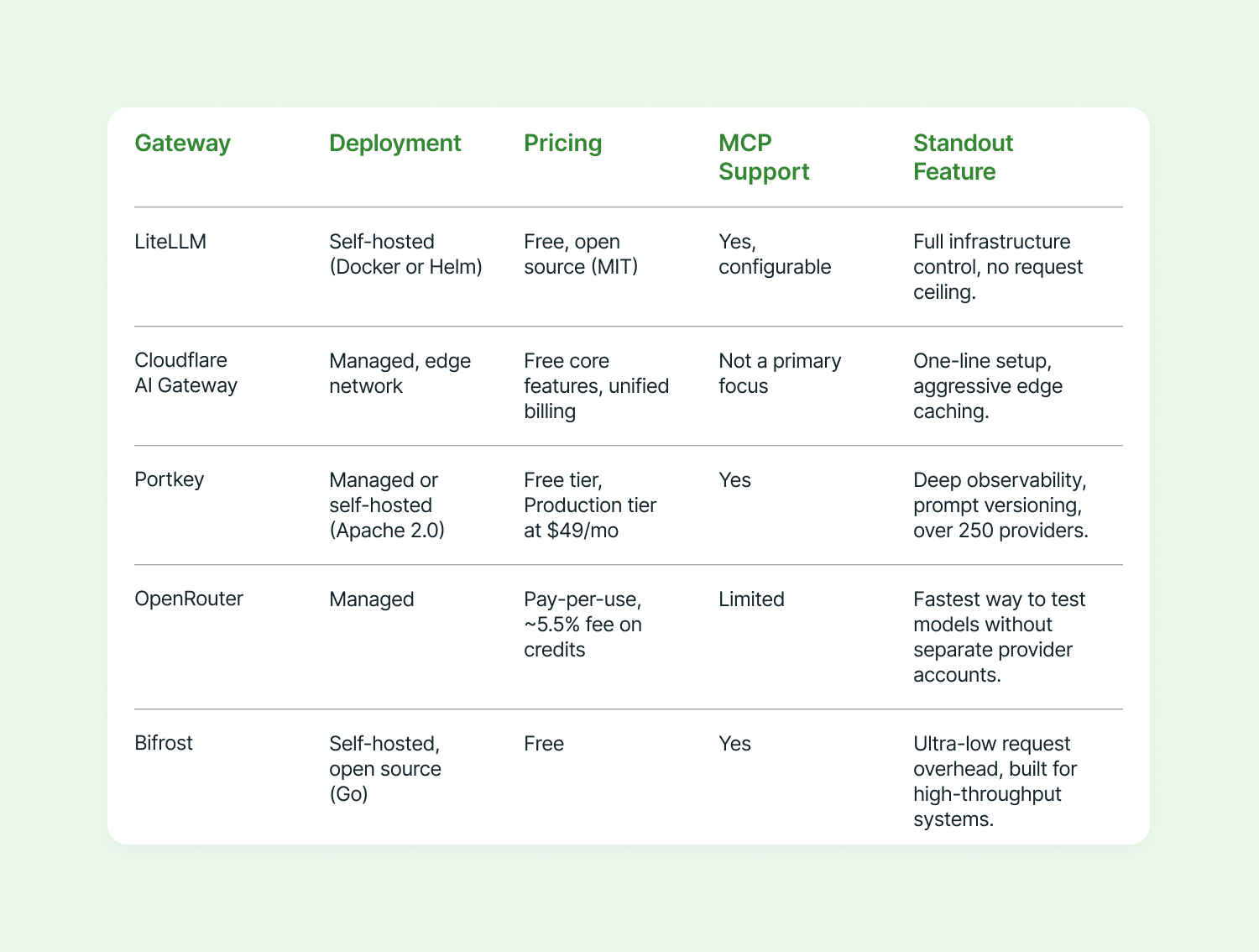
If you are evaluating Portkey, note that Palo Alto Networks acquired the company in June 2026, absorbing it into the Prisma AIRS security platform. While Palo Alto Networks pledged to support existing customers, embedding a long-term architectural dependency on a product now governed by a massive security vendor’s roadmap requires careful risk assessment.
For engineers building AI systems for external clients, LiteLLM is generally the safer recommendation.
Clients rarely want a new recurring SaaS expense stacked on top of their inference costs. They need hand-offs their internal teams can maintain without inheriting forced vendor relationships. LiteLLM is free, self-hosted, scalable, and supports the exact mix of providers most client projects demand. The trade-off—owning the infrastructure—is standard practice for competent engineering teams. Portkey remains a viable alternative if the client demands managed observability without touching infrastructure, as its lower tiers accommodate smaller budgets.
Deployment paths
Deployment strategies generally branch into two paths.
If you require full infrastructure control, LiteLLM is the default starting point. Deployment involves a configuration file mapping model names to provider credentials, a Docker container, and an optional PostgreSQL database for spend tracking. Developers simply point their existing OpenAI SDK client at the LiteLLM endpoint, requiring zero downstream codebase changes. Virtual keys, rate limits, and fallback rules execute directly from the configuration file. The cost is operational burden: your team is responsible for patching, monitoring, and securing the deployment.
If you want to avoid managing infrastructure, Cloudflare AI Gateway offers a fully managed alternative. Developers provision the gateway via a dashboard and update their application's base URL to point to Cloudflare’s edge network, which handles caching, rate limiting, retries, and logging. Cloudflare’s 2026 unified billing feature allows teams to pay for multi-provider usage on a single invoice. However, this locks you into Cloudflare's ecosystem; if compliance mandates require in-VPC or air-gapped deployments, this managed route is impossible.
When you actually need a gateway
If you are calling a single provider from a single monolithic application, skip the gateway and call the model directly. A gateway only earns its place the moment your architecture becomes plural: integrating a second provider, spinning up a second microservice, absorbing your first surprise invoice, or trying to attribute cloud spend to a specific feature. The “one API key for many models” pitch is the least interesting value proposition. AI gateways exist because model inference has evolved from a siloed application feature into shared, distributed infrastructure.
Taking control of the AI blast radius
An AI gateway transforms unpredictable LLM spend and unmanaged blast radii from reactive crises into governed processes. Whether you self-host LiteLLM, offload to Cloudflare, or deploy a vendor solution, the test is simple: Can you state exactly which feature drove your AI spend last month? Do you know exactly what happens to your application if OpenAI or Anthropic experiences an outage right now?
If answering either question requires piecing together data from five different dashboards, you already need an AI gateway. You just haven’t built it yet.
Recent articles




Insights for leaders building AI systems
Weekly digest of the most important ideas in AI transformation.